AI Gateway: Control Cost, Risk and Reliability
 By Hitesh SUpdated on: 01/01/7011 min read
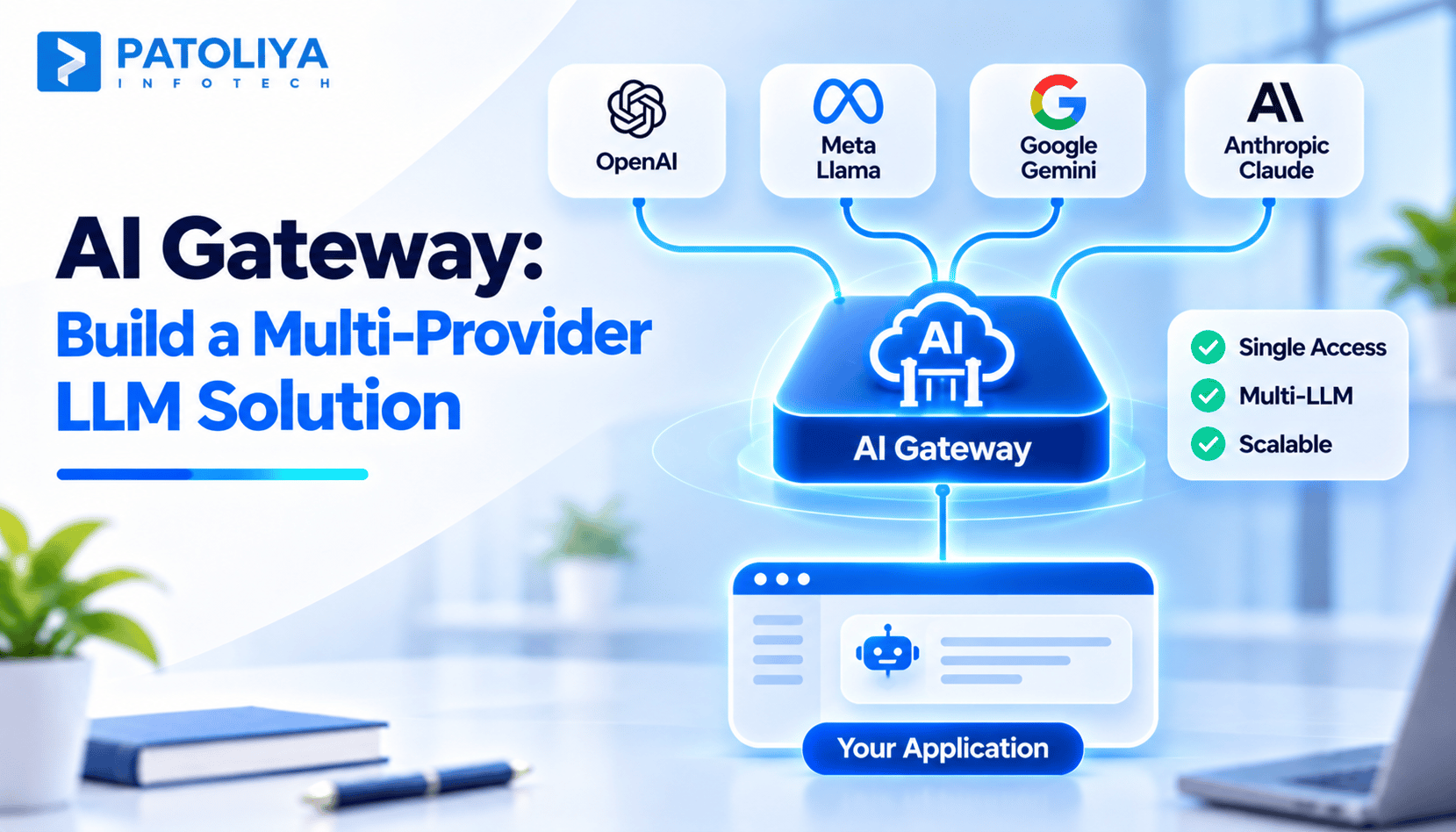
TLDR: An AI Gateway acts as a mediator between your applications and your model providers. It forwards each call to the appropriate model, fails over to a different provider in case of failure, centralizes your API keys, imposes limits, and tracks the cost of each call. Usually, a single provider and a single application don’t need it.
An AI Gateway is a layer of control that sits between your applications and one or multiple AI model providers. Each call to a model goes through it.
AI gateways consolidate the access, routing, authentication, fallback, rate limiting, and monitoring of model usage into one tool.
Without such a tool, each team wires up providers directly. Six months later, you've got API keys in five services, three implementations of retry logic, inconsistent error handling, and no one knows which feature used all the tokens last month. All of that is solved because it gives every model call one entrance point.
In this blog, we'll talk about what AI gateways are, how LLM routing and model fallback work, which controls are important, and how to implement them safely.
What Is an AI Gateway and How Does It Work?
Each request made via an AI gateway goes through the same flow. The request made from your app will be sent to a specific endpoint at the gateway, which will validate authentication and policies, including quota and the permitted models. The routing logic will decide on the model and the provider, and once the provider has responded, the gateway will return the result to your app.
This all comes down to the concept of the unified API, where you use only one API format and the gateway converts the request for each provider. In multi-agent systems, this centralised approach also helps manage model access and policies across multiple agents. Because every call passes through the same checkpoint, the AI gateway becomes the central place to manage and update policies.
These three terms get mixed up constantly.
|
Capability |
API gateway |
LLM router |
AI gateway |
|
Primary purpose |
General API traffic |
Pick a model per request |
Control all model traffic |
|
Model awareness |
None |
High |
High |
|
Routing |
By path or service |
By model or provider |
By model, cost, health |
|
Token metering |
Rarely |
Rarely |
Yes |
|
Fallback |
Basic retries |
Sometimes |
Yes |
|
Caching |
Response caching |
Rarely |
Exact and semantic |
The decision problem for an LLM router is simple – which model? The decision problem for an AI gateway is which model, who can ask, how many, and how much it will cost. An API gateway works great for typical applications but usually doesn’t work with tokens. Some groups use the name LLM gateway, and the difference between two terms is minor.
Centralized management makes sense if there are several suppliers, several applications, budget sharing, and auditability needs. A prototype connecting to one supplier doesn’t require it yet. Add the AI gateway when the second group or the second supplier joins. Usually, groups start using LLM gateway on request from the financial department for feature cost.
How AI Gateways Handle LLM Routing and Model Fallback
LLM routing decides which model handles each request. Four strategies cover most needs:
Rule-based: route by task, feature, or environment. Summaries go to model A, code to model B.
Cost-based: send simple, high-volume work to cheaper models.
Latency and availability-based: prefer the provider responding fastest or showing the best health right now.
Capability-based: save the strongest model for hard reasoning or complex output.

The vast majority of teams tend to begin with rule-based LLM routing and only introduce cost or health signals down the line. The simplest rules are less error-prone to debug at 2 a.m. You want your AI gateway to be able to allow configuration of routes without a deployment step.
Model fallback and provider failover
Model fallback is when you set up a primary model and one or more fallback models. Examples of causes include time-outs, chosen server errors, and rate limit responses.
Two actions seem alike but are not. Retry action is where the same request is sent to the same provider again. In provider failover, the request is sent to a different provider. Retrying fixes temporary issues, while provider failover deals with actual failures.
Model fallback involves compatibility problems. Your fallback model may have a different context window, treat structured data differently, and make calls using different parameters. Test every combination of your models for fallback with your actual prompts before assuming that it will work. Your fallback chain should be short.
Circuit breakers, retries, and timeouts
A circuit breaker pauses sending requests to the unhealthy provider temporarily and checks whether it works properly. In the absence of a circuit breaker, your application will continue making requests to the unhealthy provider and getting delayed responses.
All four controls above are related. Timeouts limit the waiting time. Bounded Retries and Back-off deal with transient faults. Circuit breaker limits repeated calls to the unhealthy provider. Fallback routes requests to other places.
Be careful of double billing. A request might be processed by the provider despite being timed out by your app, so retrying it will cost you double. Try using request IDs and idempotency, if available from the provider.
Imagine a customer support application. Ticket classification goes through a smaller, faster model. Complicated responses are directed at a more robust model. Should the robust model fail because its provider times out twice, then the gateway fails over to a second provider’s comparable model.
This is multi-provider llm routing in action. Fallback helps the application keep running, but the response from the fallback could be different, and an extensive outage can affect both providers anyway. The LLM routing principles involved in this example are pretty straightforward: classify small, respond big, and fail sideways.
AI Gateway Controls: Security, Rate Limits, Caching, and Usage Metering
API key management is the first win for most teams. The gateway holds the provider keys, and apps get scoped gateway credentials instead.
- Store provider secrets in a secrets manager.
- Issue scoped keys per app, team, or environment.
- Rotate keys on a schedule.
- Grant least privilege access.
- Keep development and production keys separate.
The gateway now holds every key, so its admin console needs strong authentication and audit logs. With an AI gateway in front, revoking one app’s access takes seconds. Our AI agent security checklist covers related controls.
Rate limiting and budget enforcement
Rate limiting will limit traffic to the provider over time based on either the number of requests per minute, tokens per minute, or quotas per user/team. Budgeting will cap spending overall, such as $2,000 per month for one specific feature.

They address different issues. Rate limiting will prevent an endless loop that may overwhelm the provider. Budgeting will prevent any slow yet consistent overage in spending. Use rate limiting per team through the LLM gateway.
Semantic caching and cost optimization
Exact match caching returns a stored answer only for identical prompts. Semantic caching matches by meaning, so “What’s your refund policy?” and “How do refunds work?” can share one answer.
It suits stable, repeated questions such as FAQs. Set a similarity threshold, expiry times, and a way to clear entries when source content changes. If your app uses a RAG pipeline, tie cache invalidation to document updates.
These risks are very real. Cached answers become outdated. The wrong tenant should never get the other tenant's cached answer. Permissions will always matter. Some questions are similar but will have different answers. “Cancel my order” and “cancel my subscription” appear to be similar questions but result in entirely different actions. Turn caching off to start.
Usage metering and request logging
The usage metering includes token numbers, estimated cost, provider, model, latency, status, and request ID for every single API call. By tagging the request using feature, team, or customer, one will be able to identify precisely where the money is going. This is how the AI gateway proves its value as the very first report usually shows that one feature is costing much more than anticipated.
Request logging helps debugging, but prompts often contain personal data. Redact sensitive fields before storage and restrict who can read the logs. The NIST AI Risk Management Framework gives a useful structure for these logging and access policies.
Operational metrics that matter
|
Metric |
What it reveals |
|
Error rate |
Provider and integration health |
|
Fallback frequency |
How often your primary fails |
|
p95 latency |
What slow users actually feel |
|
Token usage |
Volume trends and runaway loops |
|
Cost per successful request |
True unit economics |
|
Cache hit rate |
Whether caching earns its keep |
Track model fallback frequency per route, since a rising rate is an early outage warning. Review these numbers weekly for the first month.
Together they show whether the AI gateway is improving reliability and cost, or just adding a hop. Pair them with broader LLMOps practices.
How to Design and Deploy an AI Gateway for Production
First list your priorities: quality, latency, cost, data residency, provider availability, and the features of the models themselves. List all this out prior to configuring the AI gateway because it becomes the routing table. Then determine what workloads can use model fallback without restrictions and what requires strict compatibility. Marketing draft? It can go anywhere. Contract extraction? It has a fixed output structure and can’t fall back just anywhere.

Run each candidate model through LLM evaluation on your own prompts before adding it to a route.
|
Option |
Operational effort |
Control |
Customization |
|
Managed service |
Low |
Medium |
Limited |
|
Open source |
Medium to high |
High |
High |
|
Custom build |
High |
Full |
Full |
Open source still costs money to host, patch, and monitor. Managed services still need checking against your governance rules. Whatever you pick, make sure the LLM gateway exports logs and metrics in a format your monitoring stack reads. Our AI vendor evaluation guide helps compare options, and the AI governance framework covers policy needs.
Break your LLM gateway intentionally before the users break it. Validate timeout errors, rate limit errors, full outages, bad responses, circuit breaker failures, and the output of the fallbacks. You also need to validate streaming, authentication, quotas, and logging.
For instance, block your main provider for ten minutes and ensure that traffic flows normally, costs are normal, and output is parseable. Do such tests monthly due to changing behavior of the provider.
Start with one workload or 5% of traffic. Alert on cost spikes, latency jumps, repeated failovers, and unexpected provider usage. Keep a rollback plan, and give the gateway its own independent health check. Expand traffic in steps, such as 5%, 25%, then 100%, checking metrics at each step.
An AI gateway adds a network hop, needs maintenance, and becomes a central point of failure. It can also create lock in to the gateway itself. Run it redundantly, or keep a tested bypass path for critical workloads where availability demands it.
Test that bypass regularly, or it will fail when you need it. Apps built on multi-agent systems multiply call volume, so plan capacity early. For budgeting, see our guide on AI agent development cost.
Enterprise LLM Routing and Cost Control with Patoliya
At Patoliya Infotech, we enable companies to build their AI infrastructure, which is a combination of model performance, reliability, and cost management.
We at Patoliya Infotech have the expertise to integrate multi-provider LLM routing, fallback policies, centralized access control, and usage monitoring as per business needs.
We work towards integration of these elements into existing technologies so that CTOs can see the bigger picture of their AI investments.
Patoliya helps teams plan this layer through artificial intelligence consulting services and build the apps behind it with generative AI development services.
Conclusion
The role of an AI gateway comes into play when organizations require proper governance of model traffic among providers. Placing one at the right phase can reduce the amount of work involved in managing dispersed API keys and provider integrations. To implement effectively, it is important to have clear routing rules, proper fallback options, secure key management, proper limitations, good caching, and proper monitoring of usage.
Organizations should make sure that the LLM routing rules and fallback sequences are configurable and get reviewed quarterly as the models get updated. They should start with one workload, two providers, clear access policies, and spending restrictions. They should test the failure cases and improve the routing decisions from experience before scaling up.
FAQs:
The AI gateway enables application scalability by managing traffic centrally, provider allocation, and rates. One can increase the AI workload without replicating the integration of the provider.
A multi-provider AI gateway connects applications to model providers centrally. This enables switching of providers and models based on changing business needs.
Companies need to consider the following factors when selecting an AI gateway: compatibility, routing, security, monitoring, deployment, and pricing.
The AI gateway prevents interruptions by monitoring service provider problems, implementing timeouts, and sending qualifying requests to backup models. Well-tested fallback strategies enable business continuity when service providers fail.
It is possible to have the existing applications and enterprise systems of businesses connected to AI providers via the use of APIs. The requirements for integration include compatible authentication methods, request formats, and access policies among others.
The risks that may arise from the deployment of an AI gateway include potential bottlenecks, configuration challenges, and dependency on yet another resource.