n8n Use Cases by Industry: 10 Workflows That Save the Most Time
Workforce access to sanctioned AI and automation tools nearly doubled in a single year, from under 40% to roughly 60%, according to Deloitte's 2026 State of AI in the Enterprise report. Small and mid-size businesses are moving at a similar pace: automation adoption climbed from 22% in 2024 to 38% in 2026, with the broader market on pace to pass $25 billion by 2030. Yet most teams still pick a platform before they've ever seen it solve their own problem.
n8n's node count and pricing page won't tell you whether the platform actually clears your invoice backlog, closes your lead-routing gap, or keeps your support queue inside SLA. What answers that question is seeing it work inside a real industry, on a real process, with a real price tag attached.
This guide walks through 10 n8n Use Cases by Industry, what each one replaces, what it costs to build and run, and how to evaluate an implementation partner. By the end, you'll have concrete workflow examples, current pricing benchmarks, ROI data, and a vendor checklist you can bring into your next evaluation call.
What Is n8n and What Does It Replace?
n8n is an open-source, node-based workflow automation platform available as a managed cloud service or a self-hosted deployment. Instead of writing point-to-point integration code, you drag nodes onto a visual canvas, a trigger, a handful of logic steps, an action, and wire them together. It supports inline JavaScript and Python code nodes alongside more than 400 pre-built app connectors, which puts it in an unusual middle ground: more flexible than a pure no-code tool, faster to ship than a fully custom build.
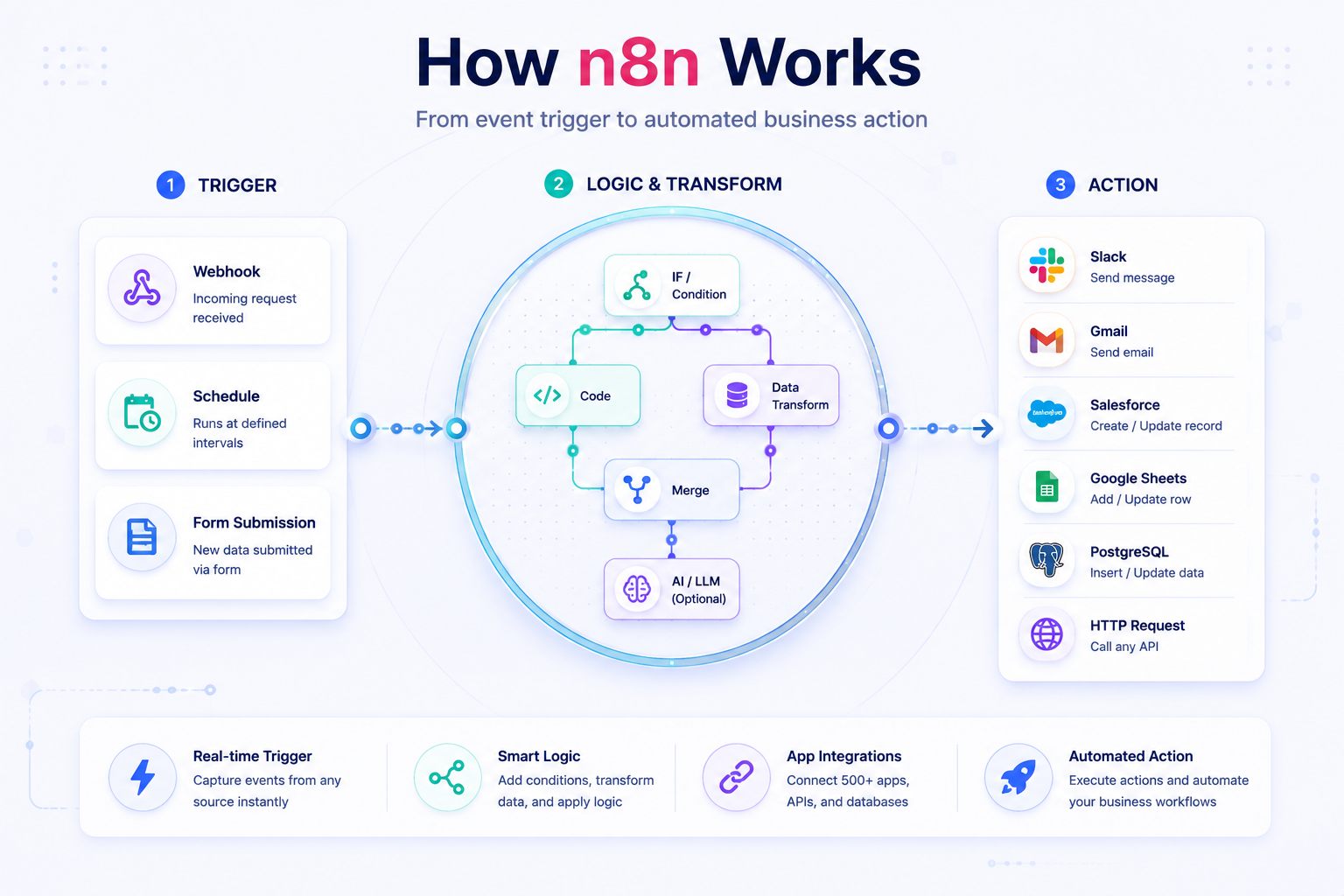
That distinction matters more than it sounds. n8n use cases are deterministic automation, if X happens, do Y not autonomous decision-making. It's worth understanding that difference before comparing n8n to newer AI agent frameworks, which solve a related but distinct problem.
In practice, n8n replaces three things most teams already have and don't love: the one-off integration script only a single developer understands, the spreadsheet someone updates manually between two SaaS tools every morning, and the Zapier chain that quietly breaks the moment the logic needs a third branch. For a team running five to fifteen connected business tools, it also removes the need for a dedicated middleware layer, the workflow becomes the middleware. That shift is one piece of a broader business process automation strategy, not a replacement for one.
Two structural differences separate n8n from the tools it's most often shortlisted against. First, licensing: n8n's fair-code model allows self-hosting, so data never has to leave company infrastructure, Zapier and Make are cloud-only. Second, pricing mechanics: n8n bills by workflow execution, Zapier bills by task, and Make bills by operation. At high volume with branching logic, that difference compounds fast (the actual numbers are below, in the pricing section). RPA platforms like UiPath or Automation Anywhere sit in a different category entirely, built to automate clicks inside legacy desktop applications, not to orchestrate an API-first SaaS stack.
Core Capabilities: What n8n Actually Does
Before comparing use cases, it helps to know what's running under the hood, the four capability groups that make every workflow in the next section possible.
Trigger and Event Handling
Every workflow starts with a trigger. Webhook triggers fire in real time the moment an external event happens, a new order, a form submission, a chat message. Polling and cron-based triggers cover the apps that don't support webhooks, checking on a schedule instead. Because a single workflow can combine multiple trigger types, event-driven and scheduled logic can live inside one automation instead of two disconnected tools.
Data Transformation and Logic
This is where n8n earns its place between no-code and custom code. Built-in Code nodes handle the JavaScript or Python transformations pre-built connectors can't, reformatting a date, calculating a derived field, parsing a nested payload. IF and Switch nodes manage conditional branching, and Merge and Split-in-Batches nodes process large datasets in chunks small enough to avoid tripping a third-party API's rate limit.
Native and Custom Integrations
Pre-built nodes cover the major CRMs, ERPs, and helpdesks out of the box, and the HTTP Request node connects to almost any REST API that doesn't yet have a native one, our broader API integration guide covers how that pattern generalizes beyond n8n specifically. For proprietary or legacy internal systems with no usable API, custom node development is possible, though it's the kind of work worth scoping with a team that has already done it, not a first automation project.
Self-Hosting and Governance Controls
For healthcare and finance teams, self-hosting on-prem or inside a private VPC is often the deciding factor, it keeps data residency requirements inside the company's own cloud infrastructure rather than a third party's. Role-based access control, execution logging, and audit trails support the kind of compliance review a cloud-only platform can complicate.
n8n Use Cases by Industry: 10 Workflows That Save the Most Time
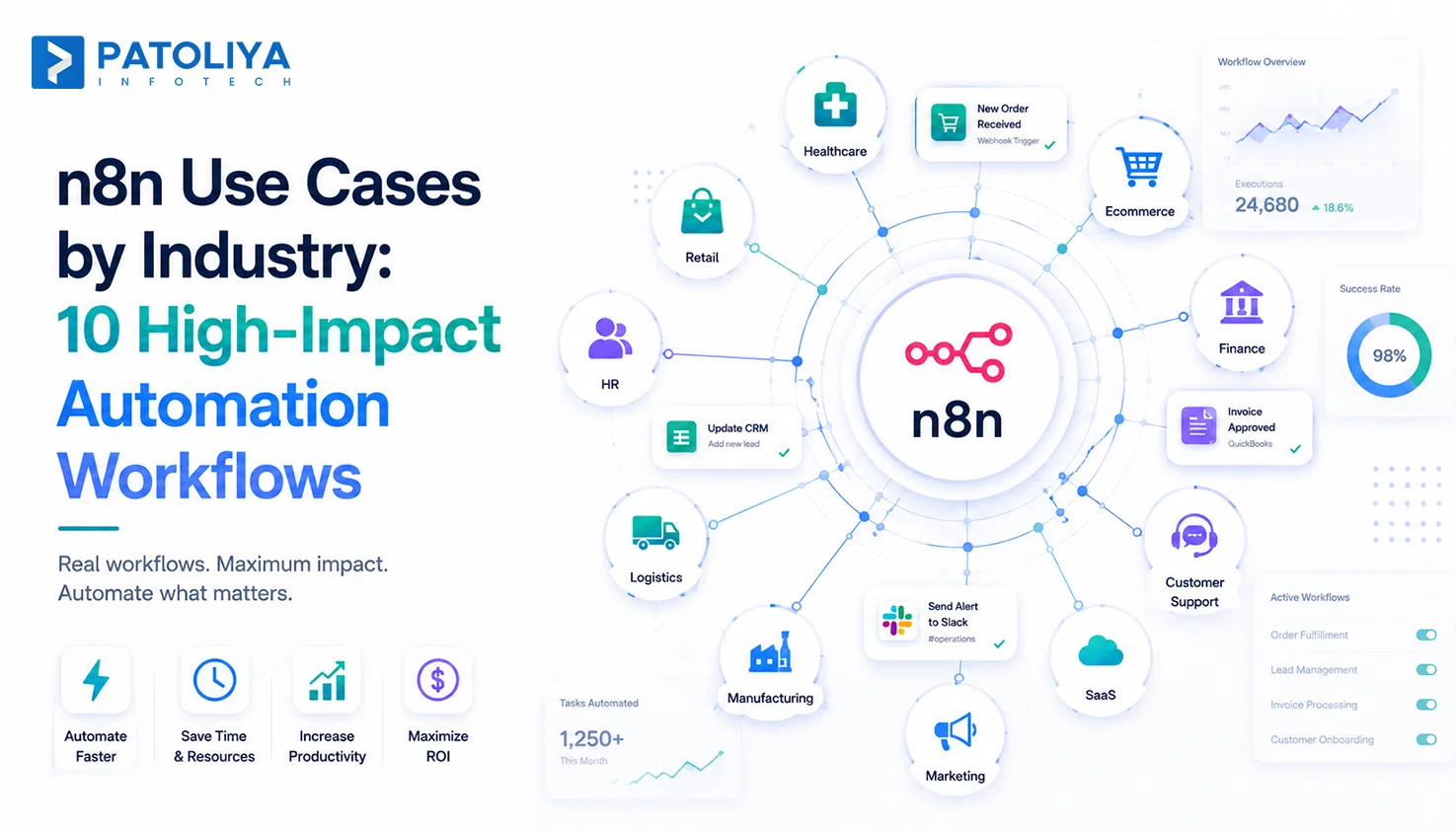
Below are the ten workflows we see most often, chosen because each maps to a specific, expensive manual process rather than a generic "automate everything" pitch. Treat each as a starting point, not a template to copy exactly; the value is in the pattern.
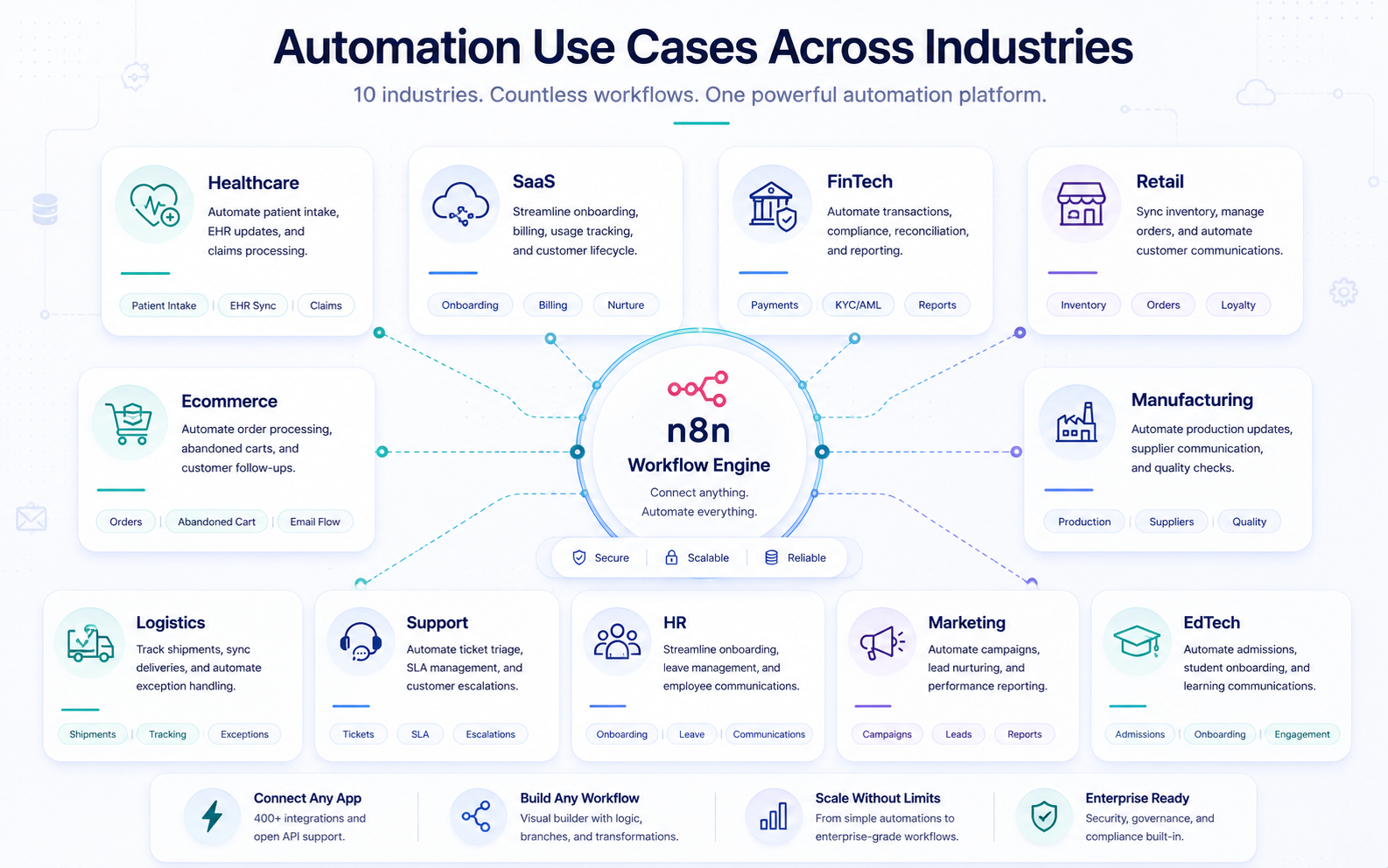
1. Ecommerce - Order-to-Fulfillment Sync
n8n listens for new Shopify or WooCommerce orders the moment they're placed, pushes them straight to the 3PL for fulfillment, and updates stock levels across every sales channel in real time. The manual alternative, someone re-keying order data between platforms, is also the most common source of overselling and fulfillment delays in growing ecommerce operations.
2. Healthcare - Patient Intake and Appointment Reminders
An EHR-triggered workflow sends SMS and email reminders ahead of appointments and syncs digital intake form fields directly into the patient record, no front-desk re-entry required. Beyond cutting admin time, this is one of the more reliable levers for reducing no-show rates; see our dedicated breakdown of patient intake automation for the mechanics.
3. SaaS - Lead Routing and Qualification
Incoming demo requests are scored and routed to the right rep by territory and deal size, then logged into the CRM automatically, a direct fix for the slow lead routing that lets warm leads go cold before anyone calls.
4. Finance and Accounting - Invoice Automation
Incoming invoice PDFs are parsed through an OCR step, matched against the purchase order already in the accounting system, and routed for approval automatically once they cross a set dollar threshold. It's core document and invoice automation, no added headcount required to keep the backlog from growing.
5. Retail - Inventory and ERP Sync
Every POS transaction triggers a stock-level update pushed straight into the ERP, which is what actually prevents overselling across warehouses and storefronts. For multi-location retailers, this is one of the highest-value ERP integration patterns available, and one of the fastest to pay back.
6. Customer Support - Ticket Triage and Escalation
Incoming tickets are classified by keyword and urgency, auto-assigned to the right queue, and escalated automatically when an SLA breach is imminent, customer support automation applied at the exact point it matters: before a customer has to follow up twice.
7. Manufacturing - Supplier Order Confirmation
Purchase orders go out to the supplier portal, confirmations are parsed automatically as they come back, and mismatches get flagged to procurement before they turn into a production delay. For manufacturing teams running dozens of active POs at once, that early flag is the entire value proposition.
8. Marketing - Campaign Reporting Rollup
Spend and performance data is pulled nightly from every ad platform in use and compiled into a shared dashboard, eliminating the export-and-paste cycle that used to eat a Monday morning before reporting. It pairs naturally with the broader shift toward AI-assisted marketing operations.
9. HR - Employee Onboarding Checklist
A new-hire record landing in the HRIS triggers account provisioning, a welcome email sequence, and IT ticket creation in parallel - instead of a manual checklist routed across three departments one email at a time. For teams evaluating their broader HR information systems, onboarding is usually the first workflow worth automating.
10. Logistics - Shipment Tracking and Exception Alerts
Carrier APIs are polled continuously for status changes; delay or exception events push straight to Slack and trigger a customer notification workflow automatically, before the customer has to ask where their shipment is. It's a small workflow with an outsized effect on support ticket volume for logistics teams.
Problem-Solution: Why Teams Move Off Manual Processes
The ten workflows above are specific instances of four recurring problems. It's worth naming them directly, because the mechanism n8n uses to solve each one is exactly what you should ask any implementation partner to demonstrate.
Data Re-Entry Across Disconnected Tools
Solution: Native connectors, combined with the HTTP Request node, sync records bidirectionally without adding a separate middleware layer to maintain.
Delayed Response to Time-Sensitive Events
Solution: Webhook and polling triggers execute within seconds of the source event, replacing the next-day batch job most teams don't realize they're still running on. Our guide to event-driven architecture covers the underlying pattern in more depth.
IT Backlog for Every New Integration Request
Solution: The low-code canvas lets ops and RevOps teams build or adjust workflows themselves, without waiting on a dev sprint for every request that lands in the backlog.
No Visibility Into Where Automations Fail
Solution: Built-in execution logs and dedicated error-workflow nodes route failures straight to a monitoring channel automatically, the kind of operational discipline any DevOps team recognizes as table stakes, not a nice-to-have.
n8n vs. Alternatives: Market Comparison
n8n rarely gets evaluated in a vacuum, most buyers are also looking at Zapier, Make, or the option of building it themselves. Here's how the mechanics actually compare, with current pricing.
n8n vs. Zapier
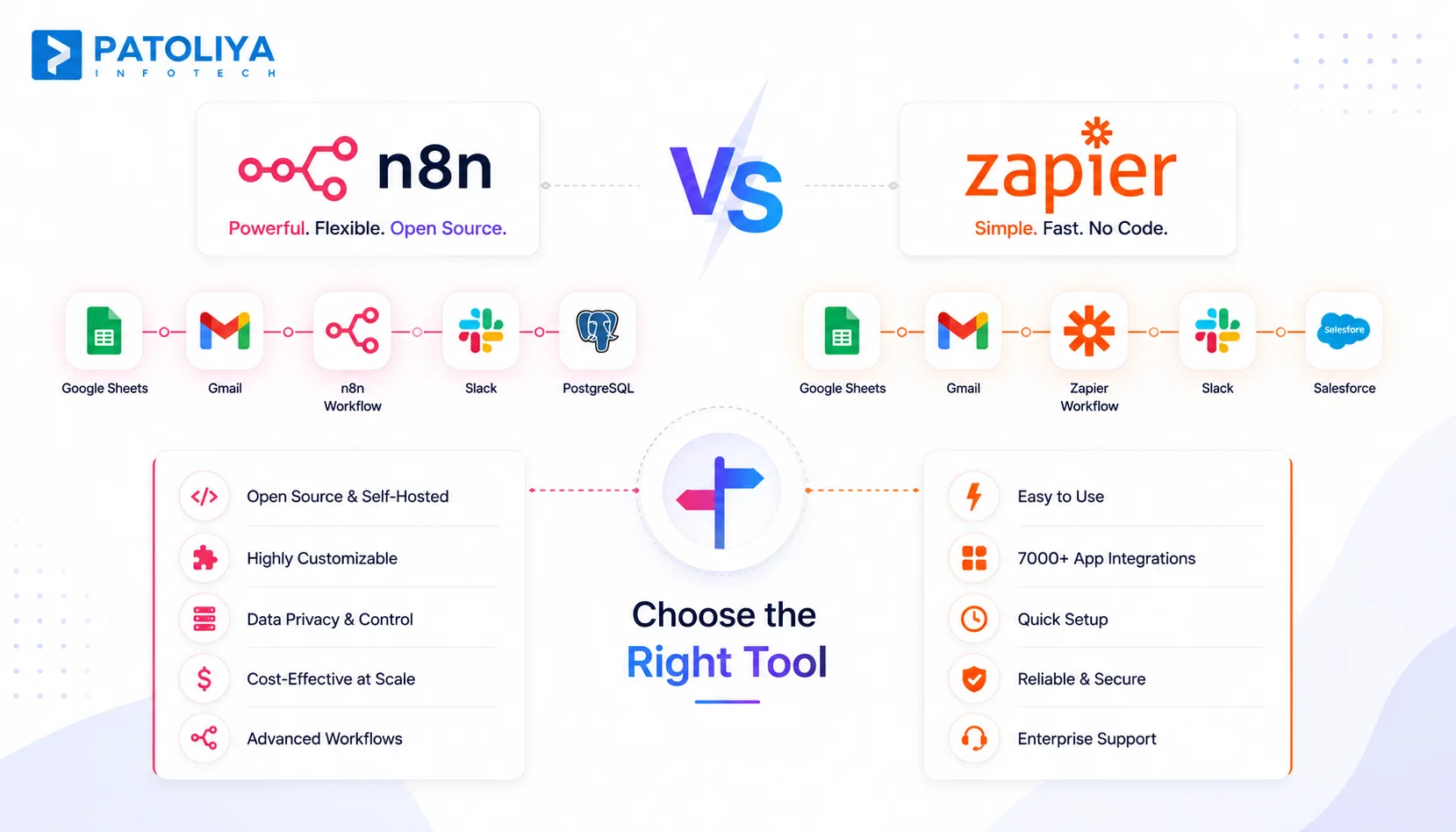
n8n bills by workflow execution; Zapier bills by task, where a task is one action step that runs successfully, a five-step Zap that fires once burns five tasks. The two look similar at low volume; the gap opens once workflows involve loops, retries, or multi-step branches, because every one of those steps is a billable task on Zapier and often a single execution on n8n. Zapier's Professional tier starts at $19.99/month (billed annually) for 750 tasks and scales up a slider toward 2 million tasks; n8n's Starter tier is €20/month for 2,500 executions with unlimited steps per execution, a structurally different bet on where your workflows will grow.
n8n vs. Make (Integromat)
Both platforms offer a visual, multi-step canvas, and Make is genuinely one of the more affordable serious options, Core starts around $9-10/month for 10,000 operations. The differentiator is self-hosting: n8n's fair-code license lets you run the platform on your own infrastructure, while Make's cloud-only model simply can't offer teams with data residency or compliance requirements.
n8n vs. Custom-Built Integrations
A custom point-to-point integration typically takes longer to ship than a workflow-tool build and carries ongoing maintenance risk tied to a single developer's availability, if they leave, so does the institutional knowledge of how it works. n8n use cases are visual and editable by any team member with canvas access, which matters more than it sounds the first time the person who built an integration goes on vacation mid-incident.
Comparison Table
|
Platform |
Deployment |
Pricing Model |
Starting Price (2026) |
Self-Hosting |
Best Fit |
|
n8n |
Cloud or self-hosted |
Execution-based |
€20/mo - 2,500 executions |
Yes |
Complex, logic-heavy, or compliance-sensitive workflows |
|
Zapier |
Cloud only |
Task-based |
$19.99/mo - 750 tasks |
No |
Simple point-to-point automations, fastest setup |
|
Make (Integromat) |
Cloud only |
Operation-based |
~$9-10/mo - 10,000 ops |
No |
Visual multi-step flows, budget-conscious mid-complexity |
|
Custom-built |
Wherever hosted |
Dev time + maintenance |
Project-based |
N/A |
Highly proprietary or legacy-system logic |
→Get a scoped estimate for your n8n workflow build.
Pricing and Implementation Cost
Server hosting for a self-hosted instance typically runs $20-$150/month depending on execution volume, on top of implementation labor, which is the real cost driver. Our software cost estimation guide breaks down how agencies typically scope that labor, and our cloud cost optimization guide is worth a look if you're already running infrastructure you'd rather share with the workflow layer than duplicate.
As of mid-2026, n8n's own pricing page lists four tiers: Starter at €20/month for 2,500 executions, Pro at €50/month for 10,000 executions, Business at €667/month for 40,000 executions with SSO/SAML and Git-based version control, and a custom Enterprise tier above that. Every tier includes unlimited users and unlimited active workflows, the real constraint is executions, not seats, which is worth checking against your own volume before committing.
|
Complexity
|
What It Covers
|
Typical Price Range
|
|
Simple, single-app
|
One trigger, one action, minimal branching
|
$500 - $1,500
|
|
Mid-complexity, multi-app
|
Conditional branching, basic error handling
|
$2,000 - $6,000
|
|
Complex, ERP/EHR-grade
|
Custom nodes, legacy integration, compliance controls
|
$8,000 - $25,000+
|
Third-party API rate-limit overages, ongoing maintenance for any custom nodes, and the setup time for error-monitoring and alerting rarely show up in an initial quote, ask about all three before signing.
Most implementation partners work one of three ways: fixed-scope pricing per workflow, a monthly retainer for ongoing automation requests, or a dedicated automation engineer through staff augmentation for teams building continuously enough to justify a full-time resource.
ROI and Business Impact
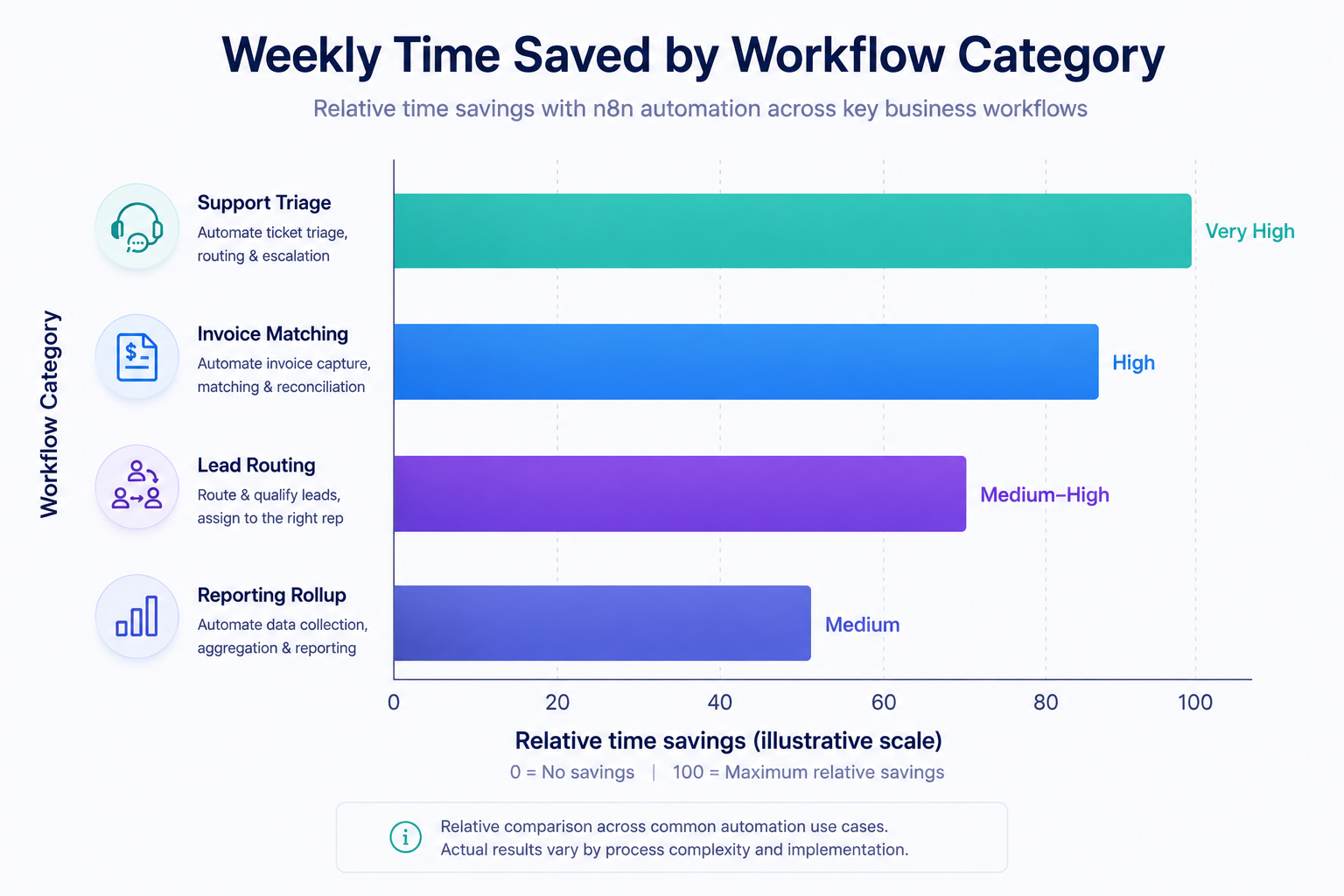
Support triage and invoice-matching workflows typically return the fastest time savings of any category, since both involve high-volume, repetitive manual review, a useful lens for deciding which of the ten workflows above to build first.
Teams that automate ticket triage and data entry commonly redirect the freed-up hours to higher-value work rather than backfilling the role outright. Broader industry ROI research on workflow automation platforms puts typical returns in the 111%-330% range with payback periods under six months, alongside average operating-cost reductions near 35% for teams running AI-assisted automation.
A workflow built in n8n typically ships in days rather than the multi-week cycle of a custom point-to-point integration built from scratch, a gap that compounds every time a new integration request lands in the queue.
Adding a new workflow costs a fraction of adding headcount, since the connector library and underlying infrastructure are already in place. That's the core economic argument for automation over marginal hiring, and it only strengthens as execution volume grows.
Risks and Challenges
Confirm workflow ownership and source-code handover terms in the contract before an outsourced team builds anything self-hosted, this should be explicit, not implied.
Time zone gaps and unclear documentation handoff are the most common causes of post-launch support delays; ask what a typical handoff document actually contains before the project starts.
Untested error paths are the leading cause of silent workflow failures, requiring a documented test plan that covers failure states, not just the happy path, before go-live. It's the same discipline behind proper software testing and QA on any production system, and a workflow touching real customer data is production software the moment it goes live.
Fixed-scope contracts should define exactly which nodes, triggers, and error-handling paths are included, so a legitimate new requirement doesn't turn into mid-project renegotiation.
Vendor Selection Checklist
Use this checklist when scoring implementation partners. It's adapted from the broader framework in our AI vendor evaluation guide and our IT vendor management framework, narrowed to what actually matters for an n8n build specifically.
- Documented n8n project history - not just general automation experience.
- A self-hosted deployment they can show for a compliance-sensitive client.
- A written test plan covering error paths, not just the happy path.
- Pricing structured as fixed-scope, retainer, or time-and-materials, stated clearly upfront.
- Documentation thorough enough for an internal team to maintain workflows post-handoff.
- A stated average time-to-first-workflow for a client of comparable complexity.
- Monitoring and alerting setup included in the build, or clearly sold as an add-on.
- IP and source ownership stated explicitly in the contract.
- Named industries (ERP, EHR, CRM systems) they've integrated with before, see examples in our case studies.
- A scoped estimate offered before requiring a signed retainer.
Top n8n Implementation Partners to Evaluate
In-House Hire
Best fit when automation is a permanent, ongoing function inside the business. Highest fixed cost, slowest to get started, but full long-term control, worth it once you're running more than a handful of active workflows.
Freelance n8n Specialist
Best fit for a single, well-scoped workflow. Lowest cost of entry, but limited capacity and no bench to fall back on if the project scales up mid-build.
Boutique Automation Agency
Best fit for a handful of interconnected workflows. Typically faster turnaround than an enterprise systems integrator, with more senior attention per project than a freelancer can offer alone.
Enterprise Systems Integrator
Best fit for large, multi-department ERP or EHR rollouts that require formal change management. Highest cost, longest timeline, an appropriate scale for the size of problem it solves.
Patoliya Infotech
Patoliya Infotech was founded in 2015 and is headquartered in Surat, India, with a team of roughly 50-60 engineers spanning custom software, AI/ML, and integration work. The stack covers PHP, Node.js, Python, Java, .NET, React, Vue, and Next.js, with client delivery across healthcare, fintech, ecommerce, logistics, and manufacturing.
Hourly pricing sits in the $25-$49 range (Clutch, TechBehemoths - July 2026), and the best-fit use case is mid-to-complex n8n builds that need ERP- or EHR-level integration alongside broader custom software development support, not a single isolated workflow.
→Book a consultation to scope your n8n build.
Why Patoliya Infotech
- Nine-plus years of custom software delivery (founded 2015), with a team large enough to staff parallel workflow builds without a single-developer bottleneck.
- Direct, hands-on experience integrating with ERP, EHR, and CRM systems across healthcare, fintech, ecommerce, logistics, and manufacturing clients, not theoretical case studies.
- Full-stack coverage across PHP, Node.js, Python, Java, and .NET means custom nodes and edge-case logic don't require bringing in a second vendor.
- Transparent hourly pricing and fixed-scope options, with project sizes starting under $5,000 for a single workflow.
- In-house QA and DevOps functions support production-grade error handling and monitoring, not just a working demo.
- A documented handoff process, so internal teams can actually maintain workflows after launch instead of calling back for every small change.
Ready to see how this applies to your stack? Schedule a technical scoping call to map your first three n8n workflows against a fixed-scope quote.
Conclusion
Workflow automation has moved from an early-adopter experiment to a default operating requirement across every function covered in this guide - support, finance, HR, logistics, and beyond. Choosing between n8n, its alternatives, and an implementation partner comes down to three questions: what your self-hosting and compliance needs actually are, which pricing model fits your execution volume, and whether a vendor has a documented track record with your specific systems. If one of the ten workflows above matches a process you're still running by hand, that's the one worth scoping first. Schedule a technical scoping call with Patoliya Infotech to turn it into a fixed-scope build.
Frequently Asked Questions
A: Simple single-app workflows run $500-$1,500; multi-app workflows with branching logic run $2,000-$6,000; complex ERP or EHR integrations run $8,000-$25,000+ (Clutch, GoodFirms - July 2026).
A: n8n bills by execution, starting at €20/month for 2,500 executions; Zapier bills by task, starting near $20/month for 750 tasks; Make bills by operation, starting around $9-10/month for 10,000 operations. Self-hosting aside, the model that wins depends on how many steps your workflows actually run per trigger.
A: A single well-scoped workflow ships in days to two weeks; multi-department integrations with ERP or EHR systems typically take four to eight weeks depending on data-mapping complexity.
A: Yes. n8n's fair-code license allows self-hosting on a private server or VPC, which supports data residency and compliance requirements that cloud-only platforms can't meet.
A: Basic workflows require no code. Complex logic, custom nodes, or API edge cases benefit from a developer familiar with JavaScript or Python for the built-in Code node.
A: Self-hosted n8n can be configured to meet HIPAA or similar data-residency requirements since data stays on the client's infrastructure, but compliance depends on deployment architecture, not the platform alone - confirm this with your implementation partner.