How to Build AI Agents in n8n (2026 Guide)
n8n has crossed 230,000+ active users and grown its AI Agent feature set fast enough that Gartner's broader projection, 40% of enterprise applications embedding task-specific AI agents by the end of 2026, up from under 5% in 2025, is already visible inside a single automation platform. That's not a slow curve. It's a category shift happening inside a tool teams already use every day.
Most n8n builders, though, are still working the way they always have: trigger, condition, action. Linear. Predictable. Fragile the moment an edge case shows up. The AI Agent node breaks that pattern entirely, and most teams have never opened it.
This guide goes deeper than the usual walkthrough. We'll cover exactly how the AI Agent node reasons, which memory backend actually survives a production restart, where teams lose weeks debugging tool calls, and because most guides stop at the technical layer, how to decide whether to build this in-house, hire a freelancer, or bring in a partner. If you want the difference between an AI agent and a standard automation workflow spelled out first, that's worth a detour before you continue.
What Is the n8n AI Agent Node?
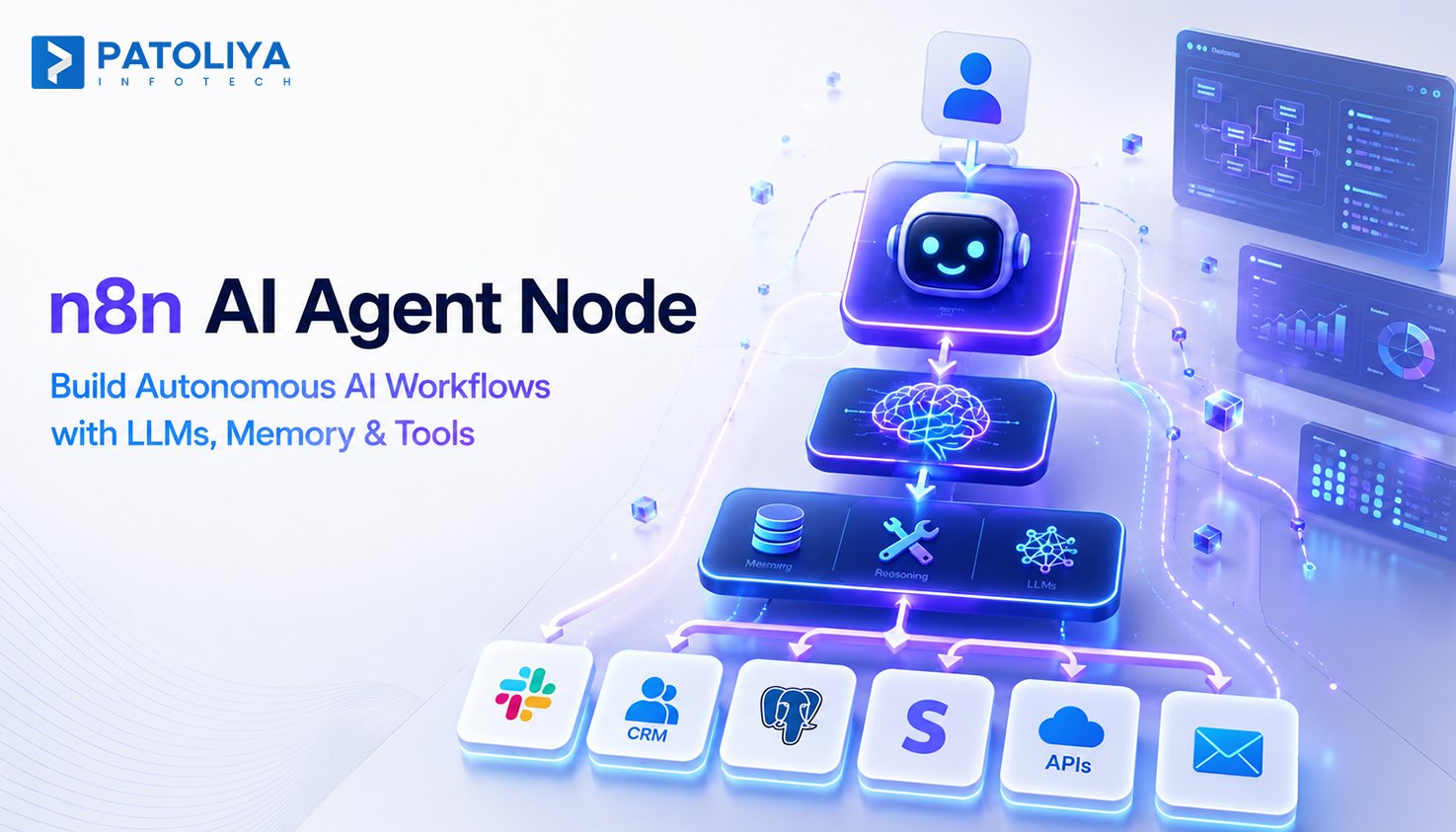
Strip away the hype and the AI Agent node is a specific architectural pattern: an LLM (the "chat model") wired to a memory store and a set of tools, running inside a loop that lets it decide what to do next rather than following a path you hardcoded. It doesn't just answer a prompt, it reasons about a goal, picks an action, checks the result, and decides whether to act again or stop.
Because it lives inside n8n, that agent isn't limited to a chat window. It runs inside the same ecosystem as n8n's 1,300+ built-in nodes, which means anything you can already connect to, Slack, Postgres, Stripe, an internal REST API, can become something the agent is allowed to use as a tool.
Every n8n builder knows the pattern: a wall of IF and Switch nodes trying to anticipate every possible input. It works, until a customer phrases their request in a way you didn't predict, and the chain falls through to a dead end or an error email. The AI Agent node replaces that brittle branching logic with a model that interprets intent instead of matching patterns, the same shift that shows up across most business process automation work once a process has too many exceptions to hardcode.
Agent Types: Pick the Right Reasoning Strategy
This is where most quick-start guides get vague, and it's worth being precise. The AI Agent node exposes several reasoning strategies, not just one. Tools Agent is the modern default, it works with any chat model that supports native function/tool calling (current OpenAI and Anthropic models both do) and is the right starting point for almost every new build. ReAct-style agents remain useful for models without native tool calling, since they reason in explicit think-act-observe text steps instead of structured function calls. Conversational agents optimize for multi-turn chat rather than task completion. Picking the wrong type doesn't just underperform, it changes how failures surface, which matters enormously once you're debugging a production incident at 2 a.m.
How It Differs From Adjacent Terms
A plain OpenAI or Chat node is single-turn, it takes an input, returns a completion, and forgets everything the moment the workflow moves on. It has no memory and no ability to act. The AI Agent node adds both. It's also a different animal from code-first frameworks like LangChain or CrewAI, which give more raw control but require you to write and maintain orchestration code outside a visual canvas.
Then there's Model Context Protocol (MCP), increasingly the term teams confuse with the agent node itself. MCP isn't the agent; it's the open standard, introduced by Anthropic, that lets an agent expose or consume tools and context in a consistent format instead of every integration being a one-off API wrapper. n8n added a dedicated MCP Client Tool node so an agent can call any MCP server's tools directly, worth knowing if a vendor you're evaluating claims MCP support, because that node is what actually makes it real inside n8n rather than a marketing line.
Core Capabilities: What the AI Agent Node Actually Does
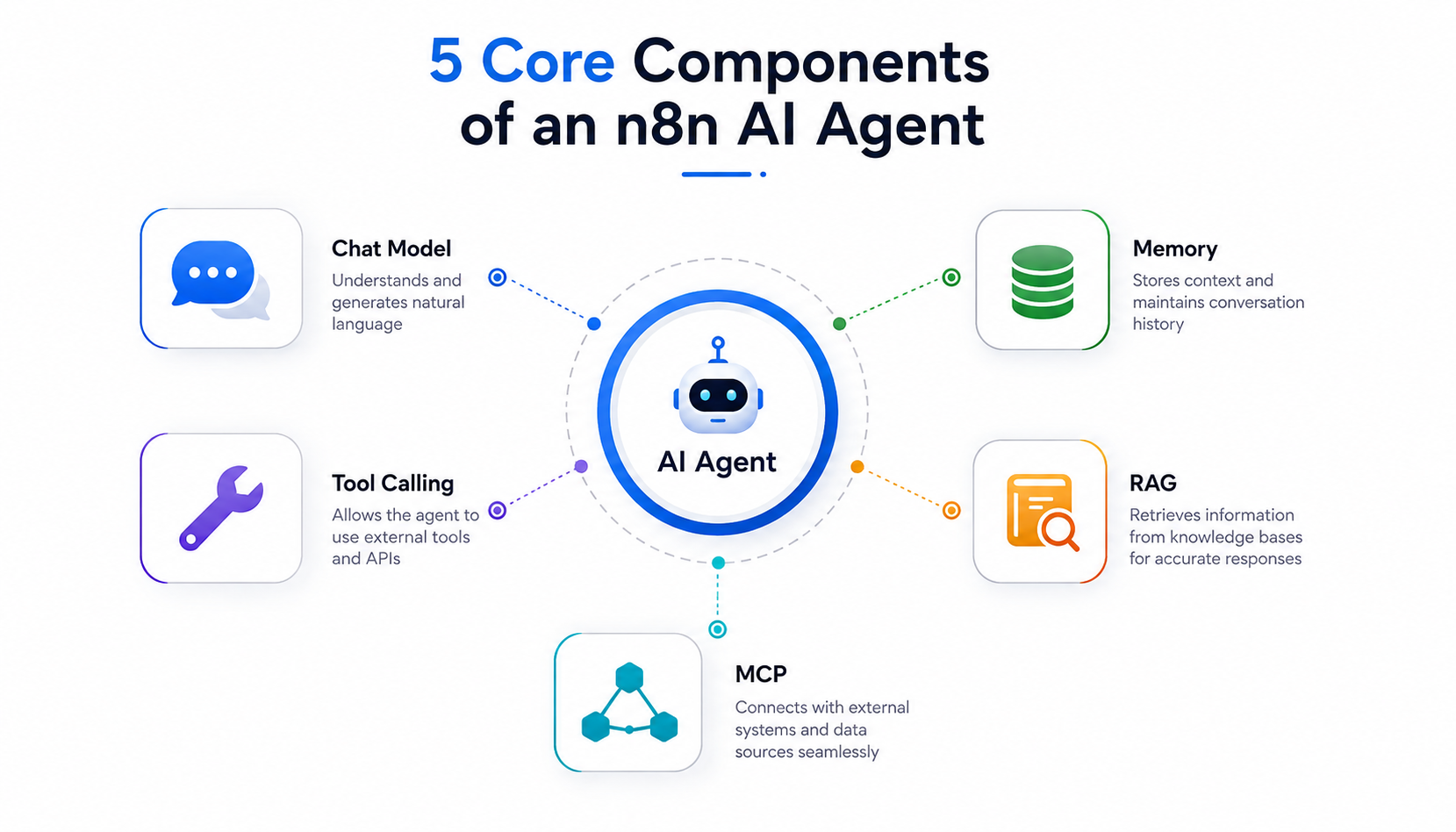
n8n's own engineering team has written about this shift in their explainer on AI agents, and the five capabilities below are what separate a real production agent from a demo.
Chat Model Selection and Routing
The agent node connects to OpenAI, Anthropic, or self-hosted local models through Ollama, and the model you choose isn't a one-size-fits-all decision. Simple, high-volume tasks, classification, FAQ lookups, basic data extraction, run cheaper and faster on lightweight models. Complex, multi-step reasoning justifies routing to a larger model. Teams that skip this routing decision either overpay on token spend or under-deliver on reasoning quality; it's one of the fastest wins available once an agent is already in production.
Memory: Three Backends, Not One
Memory is the component most builds get wrong, and "add memory" isn't specific enough advice to act on. Simple Memory stores chat history directly inside the workflow session, fast, zero setup, and completely volatile: it disappears on a restart or a redeploy, which makes it unsuitable for anything customer-facing in production. Window Buffer Memory holds the last N messages for in-session context, useful for a contained task but still lost the moment the workflow needs to remember something across separate runs. Persistent memory, backed by Postgres or Redis, keyed to a session ID, is what lets an agent recall a customer's prior tickets or a decision made yesterday. Teams that ship Simple Memory to production and then spend weeks debugging "the agent keeps forgetting" are hitting exactly this gap.
Tool Calling
This is where the agent stops being a chatbot and starts being infrastructure. Any n8n node, an HTTP request, a database query, an internal API call, can be exposed to the agent as a callable tool. The model decides which tool to call and in what sequence. A concrete example: a support agent that queries a CRM tool to pull account status, then conditionally calls a refund-processing tool only if the CRM response meets specific criteria, no human relaying data between the two systems.
Multi-Agent Orchestration
n8n's AI Agent Tool node lets one agent supervise several specialized sub-agents on a single canvas, a routing agent that hands off to a research agent, a drafting agent, or an approval agent depending on the task. This is a meaningfully different architecture from running one agent with a long tool list: each sub-agent gets its own system prompt, its own tool scope, and its own failure boundary, which keeps a single bad tool call from derailing the entire workflow.
RAG Pipeline Integration
For document-aware use cases, vector store nodes, Pinecone, Supabase, pgvector, feed retrieved context directly into the agent's prompt. Instead of answering from a static, hardcoded prompt, the agent grounds its response in whatever's actually in your knowledge base at query time. If you haven't built one before, it's worth reading through how a RAG pipeline actually comes together before wiring one into a live agent, the retrieval-quality mistakes are easy to make and expensive to unwind once an agent is already trusting a bad context.
Operational Gaps AI Agents Actually Close
Automations That Break on Unstructured Input
Free-text emails, support tickets, and form submissions don't fit neatly into regex or switch logic. LLM-based intent classification inside the agent node replaces that brittle matching with something that actually interprets what the input is asking for.
Manual Handoffs Slowing Down Multi-System Processes
When a process touches CRM, billing, and support ticketing, someone usually ends up relaying data between systems by hand. Tool calling lets a single agent traverse all three in one run, no human in the loop unless the agent flags something that needs one.
Teams That Don't Trust AI Output in Production
This is the objection every technical buyer raises, and it's a fair one. The fix isn't blind trust, it's structure. Combine structured output parsing with human-in-the-loop approval nodes so the agent can draft and act on low-risk steps while a person signs off on anything higher-stakes.
Knowledge Siloed Across Docs, Wikis, and Tickets
RAG pipeline nodes pull from a shared vector store, so the agent is answering from what's current in your knowledge base, not from whatever was true when someone wrote the original prompt six months ago.
Who Should Actually Build This: A Path-by-Path Breakdown
Once the internal case for an AI agent is made, the next decision is who builds it, and "in-house or agency" is too blunt a question. There are five realistic paths, and they carry genuinely different cost, speed, and control trade-offs.
In-House Hire
- Best fit when automation is a permanent, ongoing function inside the business. Highest fixed cost, slowest to start, hiring and onboarding alone can take longer than most first builds, but full long-term control over the roadmap. If you're learning this way, it's worth comparing the real cost of hiring a dedicated development team against a scoped external build before committing to headcount.
Freelance n8n Specialist
- Best fit for a single, well-scoped workflow. Lowest cost of entry, but limited capacity and no bench, if the freelancer is unavailable mid-project or the scope grows into a second or third agent, there's no team to absorb it.
Boutique Automation Agency
- Best fit for a handful of interconnected workflows. Typically faster turnaround than an enterprise systems integrator, with more senior attention per project than you'll get once a large SI staffs a junior delivery team on your account.
Enterprise Systems Integrator
- Best fit for large, multi-department ERP or EHR rollouts that require formal change management, procurement processes, and compliance sign-off. Highest cost, longest timeline appropriate when the agent is one component inside a much larger transformation program, not the whole project.
Patoliya Infotech
- Founded in 2015 and headquartered in Surat, India, with a team of roughly 50-60 engineers working across custom software, AI/ML, and integration projects.
- Tech stack spans PHP, Node.js, Python, Java, .NET, React, Vue, and Next.js, with client work across healthcare, fintech, e-commerce, logistics, and manufacturing.
- Hourly pricing in the $25-$49 range (sourced from Clutch and TechBehemoths, July 2026). Best-fit use case: mid-to-complex n8n builds that need ERP- or EHR-level integration alongside broader custom software support, not just a single isolated workflow.
Book a consultation to scope your n8n build →
Pricing and Cost of Building an n8n AI Agent
Tier 1: Single-Purpose Agent (1-3 tools, no persistent memory)
$1,500-$5,000 per project, typical of freelance and small-scope engagements (Clutch, GoodFirms, July 2026).
Tier 2: Multi-Tool Agent With Persistent Memory + RAG
$5,000-$20,000 per project, depending on vector store setup and the number of integrated systems, this is where most mid-market builds, including Patoliya Infotech's typical n8n scope, land.
Tier 3: Multi-Agent Orchestration (Enterprise)
$20,000-$100,000+ for self-hosted, multi-agent systems with RBAC, SSO, and audit logging, the range enterprise systems integrators typically quote for this scope.
Hidden Costs to Budget For
Beyond the build itself: LLM API token spend at scale, vector database hosting, ongoing prompt and agent-logic maintenance as source systems change, and monitoring or observability tooling. Teams that budget only for the initial build are routinely surprised by these line items in month two. Working through a proper software cost estimation process up front, rather than pricing off the headline build cost alone, is what prevents that surprise.
Contract Models
Fixed-scope pricing works for a clearly defined agent. Retainers make more sense for ongoing workflow expansion and SLA-backed support once the first agent is in production and the roadmap keeps growing.
ROI and Business Impact
Cost-Per-Contact Reduction
Contact centers deploying autonomous agents are projected to cut cost-per-contact by 20-40% by 2026 as Tier-1 resolution becomes automated. Treat this as a directional industry figure to validate against your own volume and ticket mix, not a guaranteed outcome.
Time-to-Market Impact
Because n8n is self-hosted and open-source, iteration isn't gated behind usage-tier upgrades the way it is on proprietary no-code platforms. That removes a real bottleneck between prototype and production.
Scalability Economics
n8n costs scale with infrastructure, not task volume, the opposite curve from per-task SaaS automation tools. Unit economics improve as automation volume grows instead of degrading.
Headcount Reallocation
Multi-step agents absorb Tier-1 triage and data-entry work, which frees operations staff to focus on exceptions and judgment calls, the work that actually needs a person.
Risks and Challenges to Plan For
IP and Data Ownership Risk
Confirm workflow, prompt, and custom-node ownership terms before development starts. Self-hosting reduces data-residency exposure, but it says nothing about who owns the IP unless the contract spells it out.
Communication and Timezone Risk
Offshore or distributed teams can slow iteration on agent logic if there's no real overlap in working hours. Confirm that upfront, along with a named technical point of contact, not a rotating account manager.
Quality and Hallucination Risk
Any agent step that writes to a production system or a customer-facing channel needs structured output validation and a human-approval gate. This isn't optional, it's the difference between an agent you can trust in production and one you have to babysit.
Contract and Scope-Creep Risk
Fixed-scope contracts should define exactly what "done" means per agent, tools, memory type, error handling, or prompt tuning turns into open-ended billing with no clear finish line.
Vendor Selection Checklist
Most vendor checklists stop at generic questions. These go one layer deeper, the kind of question that actually separates a vendor who's shipped production agents from one who's only built demos. For a broader framework behind these questions, see our AI vendor evaluation guide and our IT vendor management framework.
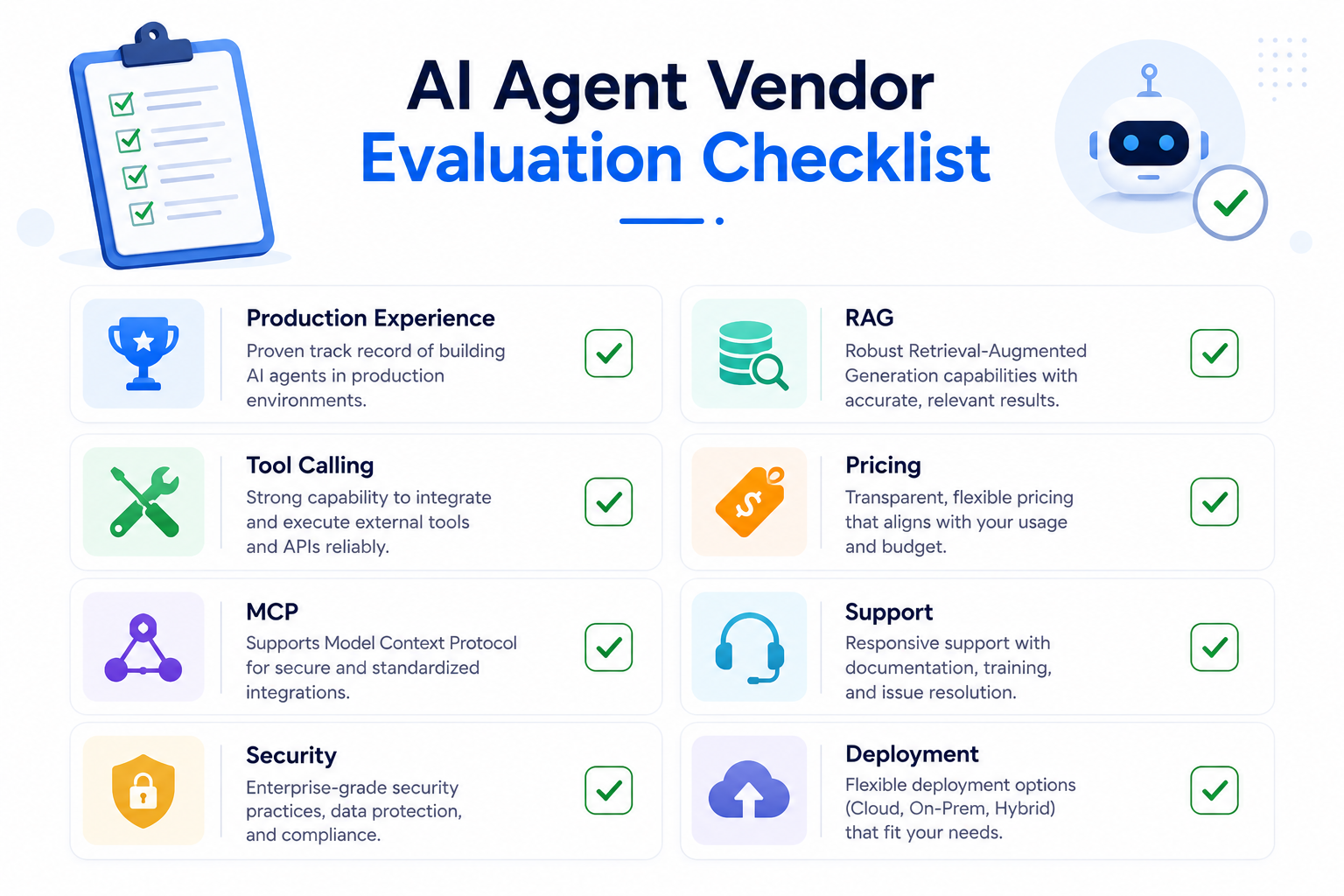
- Do they have production not just pilot n8n AI agent deployments to reference?
- Ask them to walk through what happens when a tool call fails mid-run, a vague answer here is a red flag.
- Do they support self-hosted deployment for data-residency or compliance needs?
- Can they show tool-calling and RAG pipeline work, not just linear workflow automation?
- Do they have hands-on experience with the MCP Client Tool, not just familiarity with the term MCP?
- How do they monitor token spend in production, and who gets alerted when it spikes?
- What is their post-launch support model, retainer, SLA, or one-off handoff?
- Can they provide a fixed-scope estimate with a defined "done" state per agent?
- What is their typical timeline from discovery to first production agent?
- Which memory backend do they default to, and can they explain why in plain terms?
Why Patoliya Infotech
Patoliya Infotech has been building custom software since 2015 out of Surat, India, with a team of roughly 50-60 engineers spanning custom software development, artificial intelligence and automation, and system integration work.
- Hands-on experience with n8n's full agent stack tool calling, persistent memory, RAG pipelines, and MCP-based configurations, not just prototype builds.
- Fixed-scope estimates with a defined "done" state per agent, reducing open-ended billing risk.
- Client work across healthcare, fintech, e-commerce, logistics, and manufacturing, with the ERP/EHR integration experience those industries demand.
- A tech stack PHP, Node.js, Python, Java, .NET, React, Vue, Next.js, broad enough to connect an n8n agent to almost any existing system without a rebuild.
- Transparent hourly pricing in the $25-$49 range (Clutch, TechBehemoths, July 2026), no black-box quoting. Read more about our custom AI software development approach or get in touch directly.
Book a consultation to scope your n8n build →
Conclusion
n8n AI Agent's node has moved past prompt-chaining into a production-grade orchestration layer for autonomous, multi-step workflows, but the technical build is only half the decision. Choosing the right path to build it, in-house, freelance, boutique, enterprise SI, or a mid-market partner like Patoliya Infotech, should come down to integration complexity, compliance needs, and long-term ownership, not price alone. Weigh production deployment history and post-launch support as heavily as cost, and get a scoped estimate for your n8n AI agent build today.
FAQ
How much does it cost to build an AI agent in n8n?
Costs range from $1,500 for a single-purpose agent with 1-3 tools to $100,000+ for enterprise multi-agent orchestration with self-hosting, RBAC, and SSO, depending on tool count and memory requirements (Clutch/GoodFirms, July 2026).
How does n8n's AI Agent node compare to Zapier or Make AI features?
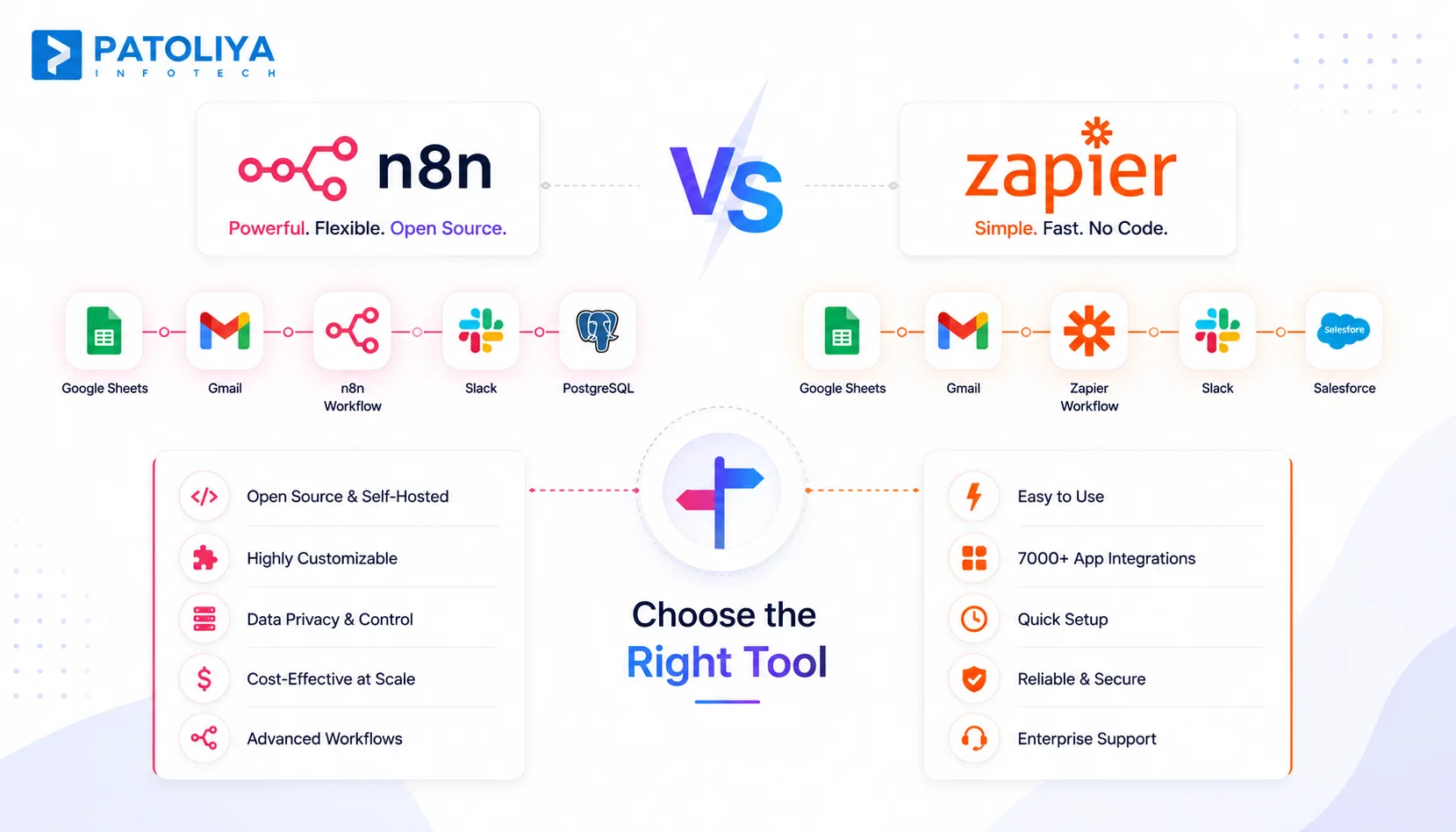
n8n is open-source and self-hostable with no per-task pricing ceiling; Zapier and Make are cloud-first and proprietary, with customization and cost limits that appear faster as agent complexity grows.
How long does it take to build a production-ready n8n AI agent?
A single-purpose agent typically takes 1-2 weeks; multi-tool agents with RAG and persistent memory take 2-6 weeks depending on integration count and whether a specialized partner is involved.
What technical components does an n8n AI agent require?
A chat model connection, a memory node (Simple, Window Buffer, or Postgres/Redis-backed), one or more tool nodes, and, for document-aware use cases, a RAG pipeline connected to a vector database.
Is it safe to run n8n AI agents on sensitive or regulated data?
Yes, when self-hosted: data stays inside your infrastructure, and workflows can be configured with local data filtering before any external LLM API call, supporting healthcare, fintech, and legal compliance needs.
Do I need coding experience to build an n8n AI agent?
No, n8n's visual builder supports agent configuration without code, though custom tool integrations and advanced memory/RAG setups benefit from developer involvement for reliability at scale.